Few things are as frustrating as pulling out your trusty Dyson vacuum, ready to tackle dirt and dust, only to find its once mighty suction has dwindled to a weak whisper. A Dyson vacuum losing suction isn’t just an inconvenience; it means your cleaning efforts are no longer effective, leaving behind pet hair, crumbs, and debris. But before you panic or consider replacing your beloved machine, understand that diminished suction is often a common issue with straightforward solutions. This comprehensive guide will walk you through the most frequent culprits behind suction loss in Dyson vacuums and provide clear, actionable steps to get your cleaner back to its peak performance, ensuring your home stays spotless.
Understanding Dyson Vacuum Suction Loss
Dyson vacuums are renowned for their powerful cyclonic technology, designed to capture microscopic dust and allergens efficiently. At its core, suction is generated by a motor creating a vacuum, pulling air—and dirt—through the machine. When your Dyson starts to lose suction, it signifies an interruption in this vital airflow or a compromise in the system’s ability to maintain that vacuum. Common indicators include your vacuum pulsing on and off, struggling to pick up even small particles, leaving visible debris behind, or simply feeling less powerful than usual. Identifying these signs early can help you address the problem before it escalates, restoring your Dyson’s cleaning prowess and extending its lifespan.
Diagnosing the Root Causes of Reduced Suction
Effective troubleshooting begins with understanding the potential reasons for your Dyson’s underperformance. Most suction issues stem from common maintenance oversights or minor blockages that are surprisingly easy to fix. By systematically checking each component, you can pinpoint the exact cause and apply the correct remedy, bringing your Dyson back to life.
Full Dust Bin
|
Our Picks for the Best Vacuum cleaner in 2026
As an Amazon Associate I earn from qualifying purchases.
|
||
| Num | Product | Action |
|---|---|---|
| 1 | Eureka NEU10AE5 Powerful Bagless Upright Vacuum Cleaner Carpet and Floor, AirSpeed Ultra-Lightweight Vacuum Cleaner, w/ Replacement Filter, Blue |

|
| 2 | Eureka PowerSpeed NEU181A Upright Vacuum Cleaner For Daily Cleaning for Pet-Owning Households , 5-Height Adjustment-Powerful Suction-Large Dust Cup-Pet Turbo Brush,Suitabe For Carpets & Hard Floors |
|
| 3 | Shark Upright Vacuum, Navigator Lift-Away Deluxe with Large Dust Cup Capacity, HEPA Filter, Swivel Steering, Upholstery Tool & Crevice Tool, Blue, NV360 |
|
| 4 | Cordless Vacuum Cleaner, 550W 45kPa 65Mins Vacuum Cleaners for Home with LED Display, Self-Standing Stick Vacuum with Anti-Tangle Brush, Rechargeable Vacuum Cordless for Pet Hair/Carpet/Floor |
|
| 5 | Eureka Lightweight Powerful Upright Vacuum Cleaner for Carpet and Hard Floor, PowerSpeed, New Model,Blue,black/New Model |
|
| 6 | MONSGA Cordless Vacuum Cleaner, 45KPa 400W Stick Vacuum for Home, 50Mins Anti-Tangled Vacuum Cleaner with Charging Dock, Light-weighted Handheld Vacuum for Pet Hair/Carpet/Floor, LED Touch Display,MV3 |
|
| 7 | UNINELL HOME Cordless Vacuum Cleaner, 45,000Pa/450W Stick Vacuum Cleaners for Home, 60 Mins Runtime, Self-Standing, Detachable Battery, Anti-Tangle Brush, Lightweight Wireless Vacuum for Pet Hair |
|
| 8 | Bissell CleanView Compact Upright Vacuum, Fits in Dorm Rooms & Apartments, Lightweight with Powerful Suction and Removable Extension Wand, 3508 |
|
| 9 | Bissell CleanView Compact Turbo Upright Vacuum with Quick Release Wand, Full Size Power, Compact Size for Apartments & Dorms, 3437F |
|
| 10 | Shark NV352 Navigator Lift Away Upright Vacuum, Hepa Filter, Anti-Allergen Technology, Swivel Steering, Ideal for Carpet, Stairs, & Bare Floors, with Wide Upholstery & Crevice Tools, Lavender |
|
One of the simplest yet most overlooked reasons for reduced suction is an overfilled dust bin. Dyson vacuums rely on unobstructed airflow to generate powerful suction. When the bin is packed to capacity with dirt, dust, and debris, it restricts this essential airflow, forcing the motor to work harder and diminishing its ability to pick up new particles. Regularly checking and emptying your Dyson’s dust bin when it reaches the “Max” fill line is a fundamental step in maintaining optimal suction. Overfilling can also lead to dust escaping back into your home or creating further blockages within the cyclone assembly.
Clogged or Dirty Filters
Dyson filters play a critical role in trapping fine dust and allergens, preventing them from being expelled back into the air. However, over time, these filters can become caked with microscopic particles, severely impeding airflow and causing a noticeable drop in suction. Dyson vacuums typically have washable filters, which need regular cleaning—often every three months, depending on usage—to maintain efficiency. Neglecting filter maintenance is a leading cause of poor performance and can even cause your vacuum to overheat. Proper cleaning and drying are essential to ensure the filters can effectively do their job without restricting air movement.
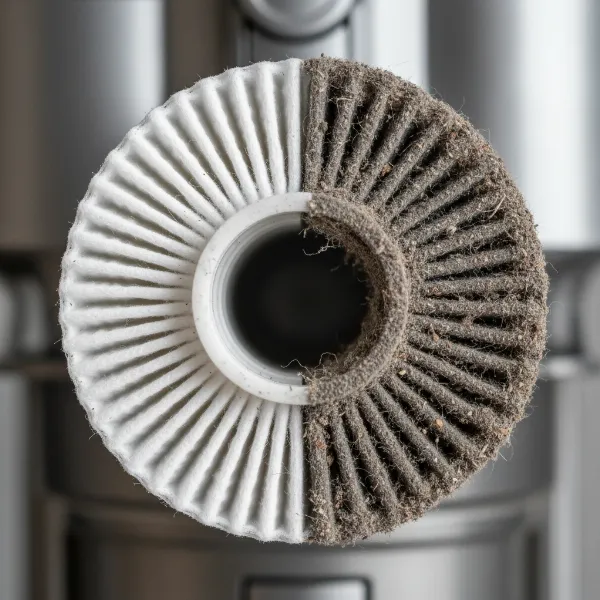 Close-up of a heavily clogged Dyson vacuum filter, showing accumulated dust and debris.
Blockages in the Airway
Dyson vacuums are powerful, but even the strongest machines can be susceptible to internal blockages. These obstructions can occur anywhere along the vacuum’s airway, from the cleaner head and brush bar to the wand, hose, or even within the main cyclone assembly. Common culprits include large debris, pet hair, socks, or even small toys that are accidentally vacuumed up. A blockage creates a physical barrier that prevents air from flowing freely, causing a significant loss of suction. Systematically checking each section for obstructions is crucial for restoring full power.
Tangled Brush Bar
While not directly impacting the motor’s suction, a tangled brush bar significantly reduces your vacuum’s ability to pick up dirt, particularly on carpets. The brush bar’s rotating bristles are designed to agitate carpet fibers and sweep debris into the suction path. When hair, threads, or other fibers become wrapped tightly around the brush bar, it prevents it from spinning effectively, or sometimes at all. This means dirt isn’t being lifted into the airflow, giving the impression of poor suction even if the motor itself is working correctly. Regularly cleaning the brush bar is vital for maintaining effective cleaning performance.
Leaks in Hoses or Seals
The entire Dyson system is designed to be airtight to create and maintain powerful suction. Any crack, tear, or loose connection in the hoses, seals, or gaskets can compromise this seal, allowing air to escape and significantly reducing the vacuum’s effective suction. These leaks can sometimes be hard to spot, especially if they are small or located in less accessible areas. Over time, rubber seals can degrade, or plastic components can become brittle and crack. A thorough inspection of all connecting parts and flexible hoses is necessary to identify and rectify any air leaks.
Step-by-Step Troubleshooting Guide for Dyson Suction
When your Dyson vacuum isn’t performing as it should, a methodical approach to troubleshooting can help you quickly identify and resolve the issue. Follow these steps to restore your vacuum’s powerful suction:
- Empty the Dust Bin: This is always the first and simplest step. Ensure the bin is completely empty and that no debris is lodged around the cyclone shroud. Tap the side of the bin gently to dislodge any fine dust.
- Clean the Filters:
- Locate your Dyson’s filter(s) – typically at the top of the main body or within the ball on upright models.
- Remove the filter(s) and rinse under cold tap water until the water runs clear. Do not use detergent unless specified by Dyson, and never use hot water.
- Squeeze (for pre-filters) or shake (for post-filters) out excess water.
- Crucially, allow the filter(s) to air dry completely for at least 24 hours in a warm, dry place before reinserting them. Reinstalling a damp filter can damage the motor.
- Check for Blockages:
- Cleaner Head/Brush Bar: Remove the cleaner head and inspect the opening for obstructions. Detangle any hair or fibers from the brush bar, using scissors if necessary.
- Wand/Extension Hose: Disconnect the wand and hose from both ends and look through them for any clogs. Use a broom handle or a long, blunt object to gently push through any blockages. Never use sharp objects that could puncture the hose.
- Main Air Inlet/Cyclone: Carefully inspect the intake port where the bin attaches and the internal cyclone for any debris or buildup.
- Inspect Hoses and Seals:
- Examine all flexible hoses for visible cracks, tears, or punctures.
- Check all connection points and rubber seals for a snug fit. If a seal appears loose or damaged, it may need to be tightened or replaced.
- Test the Vacuum: After completing each step, reassemble your Dyson and test its suction. This helps you identify which specific action resolved the problem.
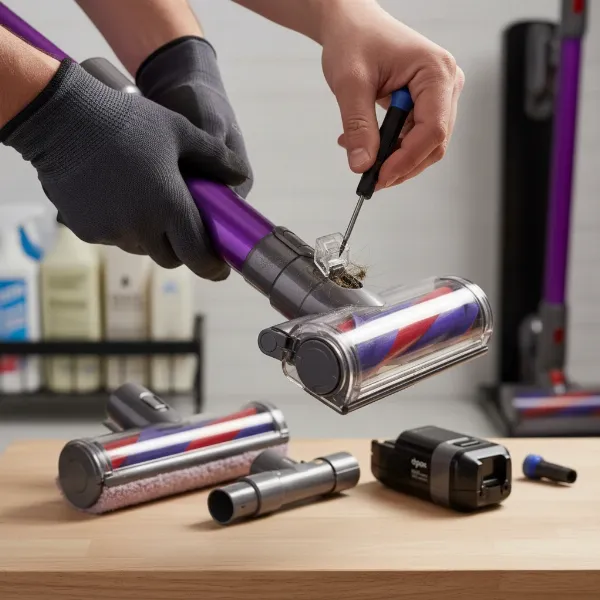 Person actively cleaning and inspecting a Dyson vacuum cleaner for blockages and dirty parts.
Preventative Maintenance: Keeping Your Dyson Performing
Proactive maintenance is key to preventing suction loss and extending the life of your Dyson vacuum. Incorporating these simple habits into your cleaning routine can save you time and frustration in the long run.
- Regular Bin Emptying: Make it a habit to empty the dust bin after every use, or at least before it reaches the “Max” fill line. This prevents fine dust from compacting and obstructing airflow.
- Consistent Filter Cleaning: Adhere to Dyson’s recommended filter cleaning schedule, typically every three months. If you use your vacuum frequently or have pets, consider cleaning them more often.
- Brush Bar Maintenance: Periodically check and clean the brush bar to remove tangled hair and debris. This ensures optimal contact with surfaces and efficient dirt agitation.
- Mindful Vacuuming: Avoid vacuuming up large, solid objects, excessive liquids, or very fine powders (like drywall dust) that can cause blockages or damage the motor and filters.
- Inspect Hoses and Attachments: Briefly check hoses and attachments for signs of wear or minor clogs before each use. Addressing small issues prevents them from becoming major problems.
When to Seek Professional Help
While many Dyson suction problems can be resolved with DIY troubleshooting, there are instances where professional assistance is necessary. If you’ve meticulously followed all the troubleshooting steps and your Dyson still exhibits poor suction, or if you encounter more serious symptoms, it’s time to consider expert intervention.
You should seek professional help if:
- The motor makes unusual, loud noises or emits a burning smell. This could indicate a motor fault that requires specialized repair.
- There’s visible damage to internal components that you cannot easily access or replace.
- Your Dyson is still under warranty, as attempting complex repairs yourself might void it.
- You’re uncomfortable disassembling parts of your vacuum, or the issue persists despite all your efforts.
Dyson’s customer support and authorized service centers are equipped to handle complex repairs and provide genuine replacement parts, ensuring your vacuum is restored to optimal working condition safely and effectively.
Conclusion
Losing suction on your Dyson vacuum can be disheartening, but it’s rarely a sign of a terminal problem. More often than not, a little investigative work and routine maintenance are all it takes to revive your machine’s cleaning power. By regularly emptying the dust bin, cleaning the filters, and meticulously checking for and clearing blockages, you can prevent most suction issues before they arise. Remember, a well-maintained Dyson isn’t just a powerful cleaning tool; it’s a long-term investment in a cleaner home. Don’t let diminished suction hold you back—take these simple steps and get back to enjoying the superior cleaning performance your Dyson was designed to deliver.
What other unexpected maintenance tips have you found to keep your Dyson running perfectly?
Frequently Asked Questions
Why is my Dyson vacuum pulsing?
A pulsing Dyson vacuum typically indicates that airflow is restricted, causing the motor to cycle on and off rapidly. This is usually due to a full dust bin, a clogged filter, or a blockage somewhere in the vacuum’s airway (hose, wand, or cleaner head). Addressing these common culprits by emptying, cleaning, and clearing obstructions will usually resolve the pulsing issue.
How often should I clean my Dyson filter?
Dyson generally recommends cleaning your vacuum’s filters every three months for optimal performance. However, if you use your vacuum frequently, have pets, or live in a dusty environment, you might need to clean them more often. Always allow the filters to air dry completely for at least 24 hours after washing before reinstalling them.
Can I use my Dyson if it’s losing suction?
While you can technically continue to use a Dyson with reduced suction, it’s not advisable. The vacuum will be less effective at cleaning, leaving dirt and debris behind. Prolonged use with restricted airflow can also strain the motor, potentially leading to overheating and permanent damage. It’s best to troubleshoot and fix the suction loss as soon as you notice it.
Are Dyson filters washable?
Yes, most Dyson vacuum filters are designed to be washable. Refer to your specific model’s user manual for precise instructions. Typically, they should be rinsed under cold water only, without detergents, and then left to air dry completely for at least 24 hours before being put back into the vacuum.
What if there’s no visible blockage but suction is still low?
If you’ve checked for visible blockages and cleaned your filters, but suction remains low, consider these possibilities: a very fine dust buildup within the cyclone assembly that’s not easily seen, a small crack or leak in a hose or seal that’s hard to spot, or a brush bar that isn’t spinning freely. If all else fails, a motor issue might be present, requiring professional diagnosis.