Few things are as frustrating as pulling out your vacuum cleaner, ready to tackle dirt and dust, only for it to remain stubbornly silent. A vacuum that won’t turn on can disrupt your cleaning routine and leave you wondering if it’s time for a costly replacement. However, many common power issues can be resolved with simple troubleshooting steps and a bit of know-how. This guide will walk you through diagnosing the problem, offering practical solutions to get your cleaning companion back in action.
Understanding Your Vacuum Cleaner’s Power Failure
A vacuum cleaner, whether a compact handheld or a robust upright, relies on a seamless flow of power and unobstructed airflow to function efficiently. At its core, an electric motor creates suction, drawing air, dust, and debris through a system of hoses, filters, and collection bins. When this intricate process is interrupted at any point—from the power outlet to the motor itself—your vacuum may refuse to start.
Historically, vacuum cleaners have evolved significantly, but the fundamental principles of operation remain. Understanding these basics is the first step in diagnosing why your machine might not be responding. Common culprits for a non-starting vacuum often include power supply issues, battery troubles in cordless models, blockages within the airflow path, or activated safety mechanisms designed to prevent damage.
Step-by-Step Troubleshooting for Common Vacuum Issues
Before you panic or call for professional help, let’s explore a systematic approach to identify and fix why your vacuum cleaner isn’t powering on.
Power Source and Cord Problems
The most straightforward issues are often the easiest to overlook. Always start with the basics of your vacuum’s power connection.
- Not Plugged In / Loose Plug: It sounds elementary, but ensure your vacuum cleaner is securely plugged into a functioning electrical outlet. A loose connection can prevent power from reaching the appliance.
- Faulty Power Outlet: Test the outlet by plugging in another small appliance, like a phone charger or a lamp, that you know works. If the second appliance also fails to power on, the issue lies with your wall outlet, not the vacuum. You may need an electrician to inspect or repair the outlet.
- Tripped Circuit Breaker / Blown Fuse: A sudden power surge or overload can trip a circuit breaker in your home’s electrical panel or blow a fuse. Check your electrical box for any switched-off breakers and reset them. If you have older fuse boxes, check for blown fuses and replace them with the correct amperage.
- Damaged Power Cord: Carefully inspect the entire length of your vacuum’s power cord for visible damage such as fraying, cuts, kinks, or exposed wires. A damaged cord can interrupt the electrical flow. If you find any damage, the cord will likely need to be replaced, as using a damaged cord can be a safety hazard.
|
Our Picks for the Best Vacuum cleaner in 2026
As an Amazon Associate I earn from qualifying purchases.
|
||
| Num | Product | Action |
|---|---|---|
| 1 | Eureka PowerSpeed NEU181A Upright Vacuum Cleaner For Daily Cleaning for Pet-Owning Households , 5-Height Adjustment-Powerful Suction-Large Dust Cup-Pet Turbo Brush,Suitabe For Carpets & Hard Floors |

|
| 2 | Eureka NEU10AE5 Powerful Bagless Upright Vacuum Cleaner Carpet and Floor, AirSpeed Ultra-Lightweight Vacuum Cleaner, w/ Replacement Filter, Blue |
|
| 3 | Shark Upright Vacuum, Navigator Lift-Away Deluxe with Large Dust Cup Capacity, HEPA Filter, Swivel Steering, Upholstery Tool & Crevice Tool, Blue, NV360 |
|
| 4 | Eureka Lightweight Powerful Upright Vacuum Cleaner for Carpet and Hard Floor, PowerSpeed, New Model,Blue,black/New Model |
|
| 5 | UNINELL HOME Cordless Vacuum Cleaner, 45,000Pa/450W Stick Vacuum Cleaners for Home, 60 Mins Runtime, Self-Standing, Detachable Battery, Anti-Tangle Brush, Lightweight Wireless Vacuum for Pet Hair |
|
| 6 | Shark NV352 Navigator Lift Away Upright Vacuum, Hepa Filter, Anti-Allergen Technology, Swivel Steering, Ideal for Carpet, Stairs, & Bare Floors, with Wide Upholstery & Crevice Tools, Lavender |
|
| 7 | Bissell CleanView Compact Turbo Upright Vacuum with Quick Release Wand, Full Size Power, Compact Size for Apartments & Dorms, 3437F |
|
| 8 | Cordless Vacuum Cleaner, 550W 45kPa 65Mins Vacuum Cleaners for Home with LED Display, Self-Standing Stick Vacuum with Anti-Tangle Brush, Rechargeable Vacuum Cordless for Pet Hair/Carpet/Floor |
|
| 9 | MONSGA Cordless Vacuum Cleaner, 45KPa 400W Stick Vacuum for Home, 50Mins Anti-Tangled Vacuum Cleaner with Charging Dock, Light-weighted Handheld Vacuum for Pet Hair/Carpet/Floor, LED Touch Display,MV3 |
|
| 10 | Bissell CleanView Compact Upright Vacuum, Fits in Dorm Rooms & Apartments, Lightweight with Powerful Suction and Removable Extension Wand, 3508 |
|
Battery and Charging Issues (for Cordless Vacuums)
If you own a cordless vacuum, the power source is internal, requiring a different set of checks.
- Low or Depleted Battery: The most common reason a cordless vacuum won’t turn on is a drained battery. Ensure the battery is fully charged. Refer to your vacuum’s manual for typical charging times; many require several hours.
- Battery Not Seated Properly: Sometimes, the battery pack might not be correctly inserted or connected. Remove the battery, then reinsert it firmly until you hear a “click” or feel it securely lock into place.
- Charging Issues: Make sure the charging cable and charging dock (if applicable) are free from damage and properly connected. Some cordless vacuums also won’t turn on if they are still plugged in and charging, so try unplugging it before attempting to start.
Blockages and Full Containers
Internal obstructions can significantly hinder airflow and even prevent your vacuum from starting due to safety mechanisms.
- Full Dustbin or Bag: A completely full dustbin or bag restricts airflow, causing the motor to work harder and potentially leading to overheating or triggering a safety shut-off. Empty the dustbin or replace the dust bag completely.
- Clogged Filters: Over time, filters (HEPA, foam, pre-motor, post-motor) become saturated with fine dust and debris, severely impeding airflow. This can cause the motor to strain and activate thermal protection. Remove and clean or replace all filters according to your vacuum’s manufacturer guidelines. Ensure reusable filters are completely dry before reinserting them.
- Obstructed Hose or Wand: A blockage in the hose or wand can prevent air from moving through the system, stopping the vacuum. Disconnect the hose and wand sections and visually inspect them for debris. Gently push a broom handle or a long, blunt object through the hose to dislodge any clogs.
- Tangled Brush Roll: The brush roll (or beater bar) often gets entangled with hair, string, and carpet fibers, preventing it from spinning. Some vacuums have safety features that prevent the motor from starting if the brush roll is jammed. Turn off and unplug the vacuum, then carefully cut away any tangled material from the brush roll using scissors.
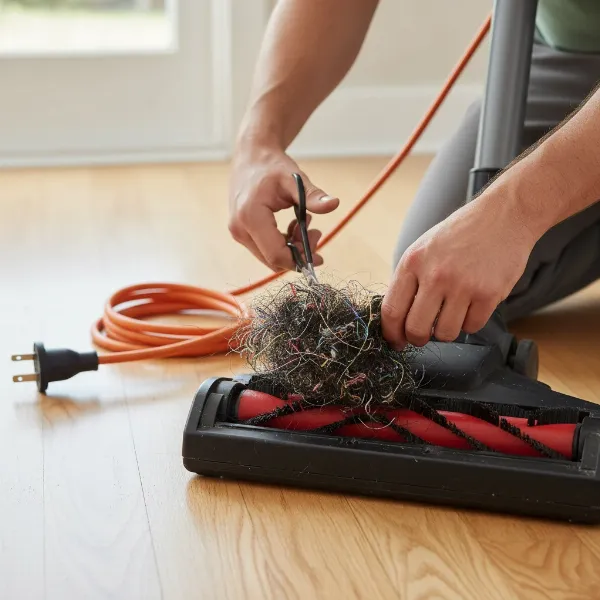 A person cleaning tangled hair and debris from a vacuum cleaner's brush roll with scissors, showing meticulous maintenance.
Overheating and Safety Shut-offs
Modern vacuum cleaners are equipped with safety features to protect their internal components from damage.
- Thermal Protection Activated: If your vacuum has been running for an extended period, or if there’s a significant blockage, the motor can overheat. Many vacuums have a thermal overload protector that automatically shuts the machine off to prevent damage. If this occurs, turn off the vacuum, unplug it, and let it cool down for at least 30-60 minutes before attempting to restart it. Also, address any underlying causes of overheating, such as full dustbins or clogged filters.
- Improper Assembly: Some vacuum models, particularly uprights and stick vacuums, have safety interlocks that prevent them from operating if key components are not correctly assembled. For instance, the dustbin, filters, or even the handle on some upright models must be securely locked into place for the vacuum to power on. Double-check that all detachable parts are properly fastened.
Faulty Components and Internal Malfunctions
If you’ve gone through all the external checks and your vacuum still won’t turn on, the issue might be with an internal component.
- Defective On/Off Switch: The power switch itself can wear out or become faulty over time. If the switch feels loose, unresponsive, or doesn’t click properly, it might not be making the necessary electrical connection. While sometimes fixable with a multimeter to check continuity, this often requires professional attention or a replacement part.
- Motor Issues: The motor is the heart of your vacuum. Signs of motor trouble include strange noises, vibrations, or a burning smell before it completely stops. Motor burnout or issues with internal components like bearings or carbon brushes are serious problems that typically require professional repair or replacement.
- Internal Wiring Problems: Loose or damaged internal wiring can interrupt power flow. This is a more complex issue to diagnose and repair and should generally be handled by a qualified technician due to electrical safety risks.
- Thermal Fuse: Distinct from the thermal overload protector, a thermal fuse is a one-time safety device that blows permanently if the motor overheats excessively, preventing further damage. If this fuse blows, the vacuum will not turn on until it’s replaced, a task usually best left to a professional.
When to Repair vs. Replace Your Vacuum
Deciding whether to repair a non-starting vacuum or invest in a new one depends on several factors:
- Age of the Vacuum: Older vacuums, especially those beyond 5-8 years, may be nearing the end of their lifespan, making costly repairs less worthwhile.
- Cost of Repair: If the repair cost approaches or exceeds half the price of a new, comparable vacuum, replacement often makes more financial sense. Simple fixes like a new power cord or battery might be affordable, but motor replacements can be expensive.
- Warranty Status: Check if your vacuum is still under manufacturer’s warranty. If so, contact the manufacturer; they might repair or replace it for free. Attempting DIY internal repairs could void your warranty.
- Severity of Issue: Minor issues like blockages or a full dustbin are easy DIY fixes. More complex problems involving the motor, internal wiring, or circuit boards usually warrant professional diagnosis.
“Many vacuum problems stem from simple maintenance oversights. A quick check of the power source, filters, and hoses can often resolve issues without needing a repair shop.” – Admin, vacuumcleanert.com
Essential Maintenance Tips to Prevent Future Power Problems
Proactive maintenance can significantly extend your vacuum’s lifespan and prevent frustrating power failures.
- Regular Emptying and Cleaning: Don’t wait until your dustbin is overflowing or your bag is bursting. Empty or replace them regularly to maintain optimal airflow and prevent strain on the motor.
- Filter Maintenance: Clean or replace your vacuum’s filters according to the manufacturer’s recommendations. Clogged filters are a leading cause of overheating and reduced performance.
- Cord Care: For corded vacuums, always handle the power cord with care. Avoid yanking it from the outlet, running over it with the vacuum, or wrapping it too tightly. Inspect it regularly for damage.
- Avoid Large Debris: Try to avoid vacuuming large objects, liquids, or sharp items that can cause blockages or damage internal components.
- Proper Storage: Store your vacuum cleaner in a dry, safe place where it won’t be easily knocked over or have its cord damaged. For cordless models, ensure they are stored with a sufficient charge.
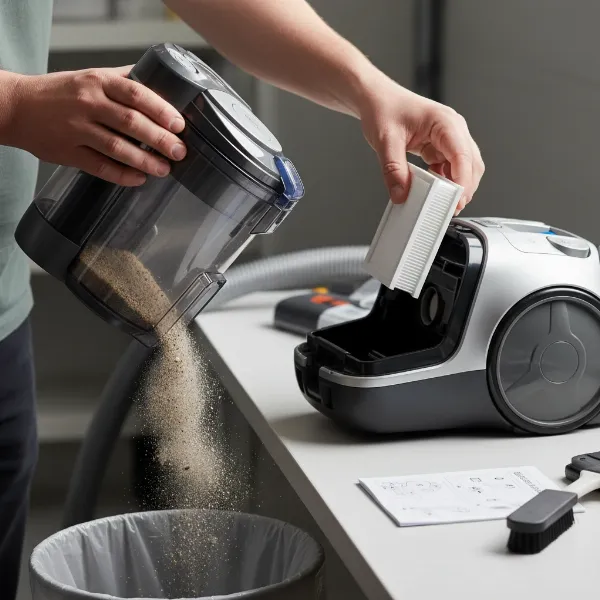 A person performing routine maintenance on a vacuum cleaner, including emptying the dustbin and cleaning filters.
Conclusion
Encountering a vacuum cleaner that won’t turn on can be a momentary inconvenience, but it doesn’t always signal the end of your appliance. By systematically checking the power source, addressing blockages, ensuring proper assembly, and performing regular maintenance, you can often diagnose and fix the problem yourself. Remember, consistent care is key to a long-lasting and reliable vacuum cleaner. If, after all your efforts, your vacuum still refuses to cooperate, consulting a professional technician or considering a new model might be the next best step. What common vacuum issues have you successfully resolved at home?
Frequently Asked Questions
Why did my vacuum suddenly stop working and won’t turn back on?
Your vacuum likely stopped working due to an activated safety feature, such as thermal overload protection, which shuts it off to prevent damage from overheating. This often happens due to clogs, a full dustbin, or prolonged use. Let it cool down for 30-60 minutes, then check for and clear any blockages before trying again.
How can I check if my vacuum cleaner’s power cord is faulty?
First, visually inspect the entire cord for any cuts, fraying, kinks, or exposed wires. Then, plug another appliance into the same outlet to ensure the outlet works. If the outlet is fine, but your vacuum still won’t turn on, a damaged cord is a strong possibility, and it should be replaced by a professional for safety.
Can a full dustbin prevent a vacuum from turning on?
Yes, in many modern vacuum cleaner models, a completely full dustbin or bag can restrict airflow so severely that it triggers the vacuum’s safety mechanisms, preventing it from turning on or causing it to shut off unexpectedly. Emptying the dustbin or replacing the bag is a crucial troubleshooting step.
How long should I let my vacuum cool down after overheating?
If your vacuum cleaner shut off due to overheating, it is generally recommended to unplug it and allow it to cool down for a minimum of 30 to 60 minutes. This gives the motor and other internal components sufficient time to return to a safe operating temperature before you attempt to restart it.
When is it time to consider a new vacuum instead of repairing it?
Consider replacing your vacuum if the cost of repair is more than half the price of a new equivalent model, especially if the vacuum is older than 5-8 years. Recurring issues, unavailable parts, or major component failures like a motor breakdown also suggest that investing in a new vacuum might be more practical.